
EvaPhone provides Internet telephone calls for free. This site offers free VoIP call solutions: free VoIP service lets you make PC-to-phone free international calls. All you need is a computer to start making free VoIP calls using Internet to phone. Start enjoying the benefits of Internet telephony right now! Its all about from COOLSEAL.
Tips:-
- Don't register on this site. If you do so you can only make 4 calls for free.
- Call without registration is unlimited and FREE!
- Choosing your country is more secure in dialing numbers.
- Don't try to see view source of this website as it can harm your browser.(ONLY BROWSER WHICH CAN BE RESTORED BY REINSTALLING).
Tips:-
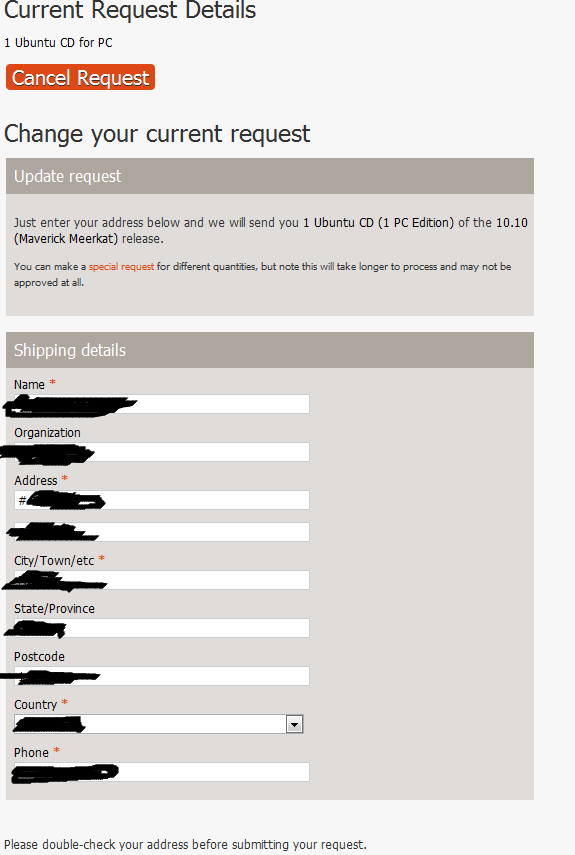
- You have to register/login to lauchpad.
- There is no request link but COOLSEAL KNOWs THE LINK.Click here to request 1 for yourself.
- You can order maximum 10 CDs per account.
- It will take 3-3.5 weeks.
- After giving your request. You can close your tab/browser.
How to Make Google do a Barrel Roll
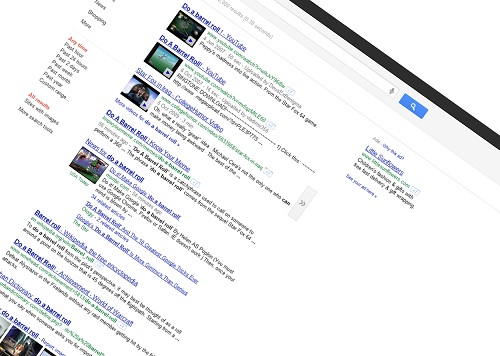
Want to learn how to make Google spin 360º? Well, it's actually quite simpler than you might think, and it's all thanks to some "Googlers" being fans of an old Nintendo game.
Just try searching for Do a barrel roll on Google main search page, and you'll see what I mean.
You might be wondering what's this is all about, but for anyone that played the old Star Fox 64 Nintendo classic, that's something that will forever be engraved in their brains (as you'll be able to see in the following video). That was a move you could perform by pressing "Z or R twice" - and if you search for it, it will make your google page spin just the same.
On the other hand, if you want to nudge your Google page just a bit, you can always search for "tilt".
Android Ice Cream Sandwich
 There's
a lot of new stuff in Android ICS. Some (most) will be instantly
recognized by anyone with a Honeycomb tablet - which
Google admitted being an emergency stopgap version made in a hurry
(that's why they never launched it as open-source) - but that will now
be done properly with this 4.0 Android version.
There's
a lot of new stuff in Android ICS. Some (most) will be instantly
recognized by anyone with a Honeycomb tablet - which
Google admitted being an emergency stopgap version made in a hurry
(that's why they never launched it as open-source) - but that will now
be done properly with this 4.0 Android version.
From what I can figure out, this really does seem to be the first
Android version made with the required amount of attention to details
that will make users want to have an Android - as opposed to have
"anything" that allowed them to access the web and their email - and
that will at last "unify" tablet and smartphone Apps under a common
interface.
Besides the hardware buttons giving way to software buttons, there are also:
- resizable widgets - and accessible in their own tab alongside the Apps
- You can easily move around Apps to the dock bar
- Easily create folder by dragging Apps into one another (like iOS)
- Easy multitasking App access, with screenshots - and that can be dismissed with a single swipe (like on WebOS)
- realtime voice transcription
- unlock by facial recognition
- "zero lag" camera photos- continuous auto-focus, realtime effects, photo editing, panoramic photos, time-lapse, zoom while recording video, etc.
- Screenshots (press power button and volume down)
- enhanced Gmail client - easier to access options (instead of hiding them)
- Android Beam - content transfer between Android via NFC
- Improved People contacts App with social integration
- Data usage controls - you can set a limit as well as see which Apps are using data
- Improved keyboard - also better copy-paste
- Pinch-to-zoom in calendar
- Direct app access in lock screen as well as see notifiations
- Improved browser (16 tabs, desktop mode)
- Able to disable "operator-installed Apps"

Lots and lots of nice features and improvements that make Android more attractive than ever (and also make iOS look old in the process... like the zero lag photos, and realtime voice transcription - as well as the "WebOS style" swipe to dismiss notifications and background apps)!
Google+ For All

The usual high-speed development cycle was seen in action once again, and Google+ has learned a lot over the past months. Take the amazing hangouts, for instance:
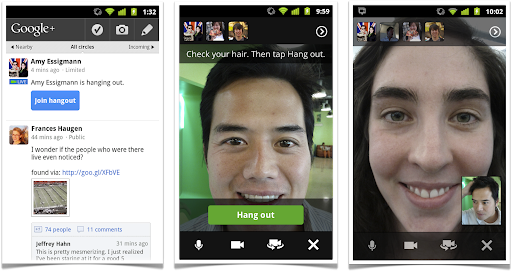
Hangouts are now better than ever, and you can now access them in your Android mobile phone (at last!) - iOS support is coming soon.
If I always thought hangouts were the most powerful weapon in Google+ arsenal, just wait until you hear the news: you can now share your computer screen over an hangout, making it perfect for remote assistance and... lots other things, whenever you want to share what's on your screen with your friends.
You can also draw and sketch stuff in a hangout, have named hangouts for theme-based discussions, and even record and broadcast your hangouts for larger audiences!
Indeed it makes Google+ the most powerful, easy to use, and appealing video-chat/sharing tool there is.
So, what are you waiting for? Joining Google+ is just a click away. :)
HTTPS Everywhere for Firefox

Often, the difference between putting your private data to risk and protecting it can be done by using a single extra letter when connecting to a web site. The most common protocol on the web is the http, and it works well for the most part - except it is a bit naive, as it assumes everything and everyone to be trustworthy.
These days we can never know who is listening to our streaming data zooming back and forth at the speed of light; and our personal details, bank account data, passwords, and lots more, become valuable info a lot of people would like to put their hands on.
This HTTPS Everywhere is a Firefox extension that will automatically use HTTPs connections for many sites that support it but keep using the unsecured connections by default
How to Save Memory in Firefox

Though Firefox is an excellent browser, the truth is... it still gobbles up quite an amount of memory, particularly if you happen to haven several dozen of tabs open at the same time.
That's why you'll probably want to give this add-on a try: BarTab.
With this add-on, you can customize the way Firefox handles multiple tabs. You can specify you don'w want it to load all tabs when restoring a session - delaying it until you actually click on each individual tab.
You can even specify you want to unload a tab from memory after a preset time of inactivty.
It's the perfect add-on for every power user with dozens of tabs open every day!
[How to save Memory in Firefox]
Firefox 5 New Features

Although Firefox 4 has just recently arrived, Mozilla's development team is already hard at work in the upcoming Firefox 5.
And it looks like Firefox 5 will have some interesting festures, although some may eventually get pushed back to future versions.
Firefox 5 will have integrated preview visualizers, for things like PDF files and even MP3 audio files, and learn some new tricks: like the ability to select multiple tabs.
More interestingly, it will have an integrated identity management system.

This will allow you to be logged in into your social network sites, like Twitter and Facebook, and even have multiple accounts active at the same time.
I don't know how they'll pull it off, in order to make it "easy to use", but I sincerely hope they succeed (and if it works for multiple Google accounts at the same time... the better!)
(And yes, I know I could use the multiple Google accounts feature right now - but I'd really prefer having my separate Google accounts separate.)
Transform any LCD into a 3D Screen
Altough I'm not really a big fan of current "pseudo-3D" technologies, how do you feel about turning your iPhone, iPad, Android, TV or computer LCD screen into a 3D display - easily and cheapily?
That's what a Japanese company is providing with their Pic3D LCD film.
These low cost plastic sheets can be placed over any LCD screen and use a lenticular lens system that create the illusion of 3D - providing you're watching 3D content in the required side-by-side format.
... As for me, I'll keep watching my iPhone 4 screen (and every other screen) in a perfectly flat 2D way, thank you. :)

